
IWAMAPC
Developed by S. M. Shuzatul Hoque
Originally built in July 2023
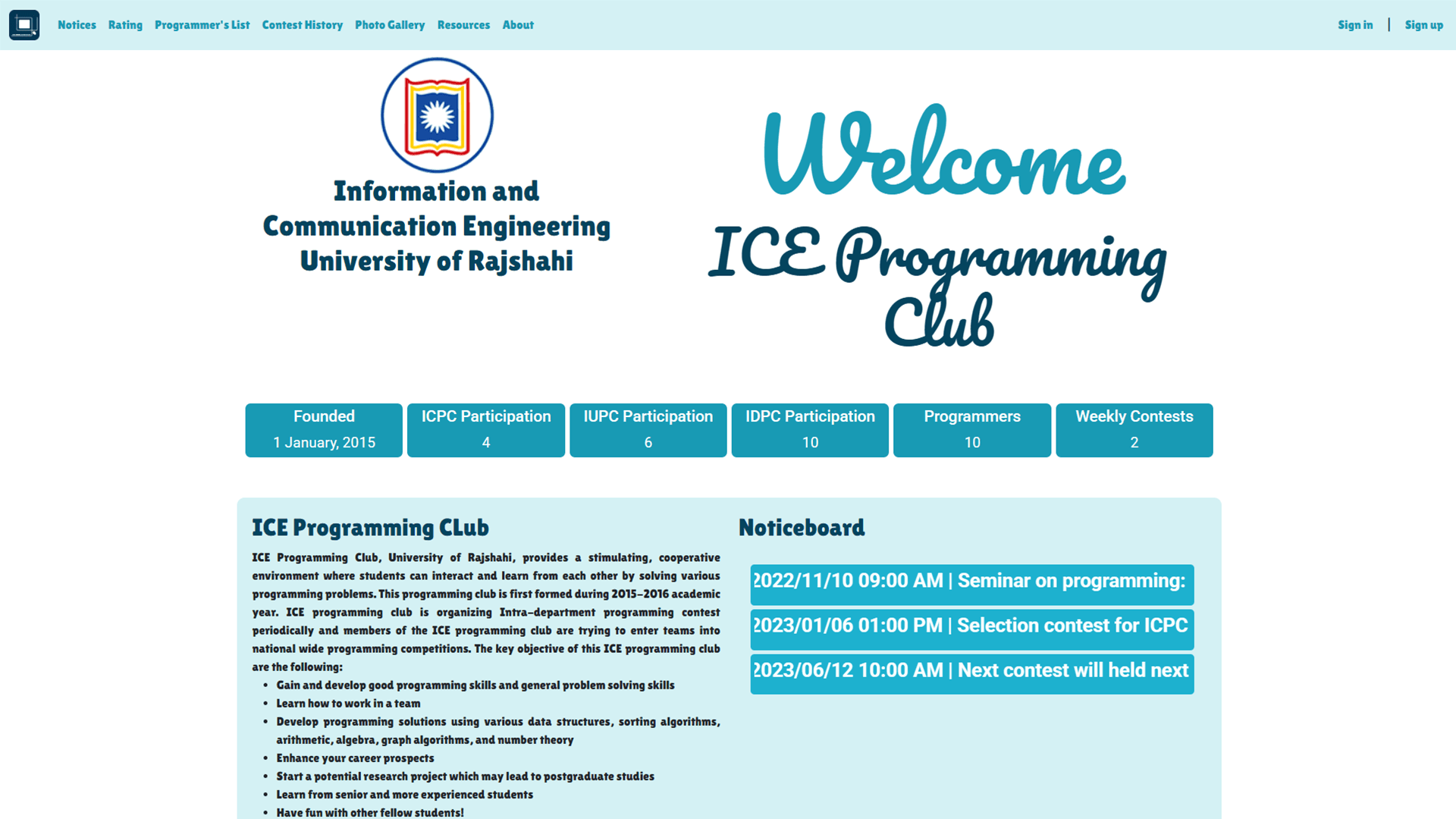
🧠IWAMAPC - Interactive Web Application for Maintaining Activities of a Programming Club
A comprehensive web application for managing and showcasing the activities of ICE programming club.
The platform enables students to create detailed profiles, track competitive programming progress, view contests and notices, explore resources, and highlight the club’s achievements — all through a role-based system.
This application was primarily developed as a University final project for the department of Information and Communication Engineering (ICE), University of Rajshahi. But it can be used for any programming club.
The frontend of this application was built using React and developed back in July 2023, focusing on scalability, clarity, and data-driven presentation.
🌟 Overview
This application serves as a centralized hub for the programming club, allowing:
- Students to manage rich profiles with competitive programming statistics
- Administrators to manage contests listing, notices, resources, and media
- Visitors to explore club activities, achievements, and learning resources
The platform emphasizes community visibility, data transparency, and role-based content management.
👤 User Profiles & Competitive Programming Integration
Registered students can create and manage detailed profiles, including:
- Personal information (name, bio, current status)
- Contact details (phone, email)
- Competitive programming handles:
- Codeforces
- LeetCode
- VJudge
- Social and platform links:
- GitHub
- StopStalk
- Codeforces
- LeetCode
📊 Profile Highlights
Each user profile dynamically displays:
- Codeforces rank
- Current rating and maximum rating
- Total solved Codeforces problems
- Total number of CF contests participated
- List of contests the user has participated in that are listed in the Contests page
This allows both students and visitors to easily assess competitive programming activity and growth.
🏆 Contests Management
- Dedicated Contest History Page listing contests participated by the department teams
- Contests are added by users and require admin approval to be listed in the contests page
- Individual profiles display contests participated by the user
- Encourages transparency and historical tracking of competitive events
🖼 Photo Gallery
- A gallery page showcasing programming club activities
- Includes event photos, contests, workshops, and gatherings
- Managed by authorized roles
- Publicly accessible for visitors
📢 Notice Board
- Notice board functionality for official announcements
- Dedicated notices page listing all notices
- Notices can be created and managed by admins
- Top notices are highlighted on the home page
📚 Resources & Blogs
- Resources page featuring blogs and learning materials
- Resources blogs can be written and published by admins and permitted users
- Content is publicly readable by visitors
- Supports knowledge sharing within and beyond the club
📄 Informational Pages
About Page
- Detailed information about the programming club
- Information about member registration, meeting, executive committee and student executive members.
Programmers List
- Displays all registered users in a sortable table
- Includes competitive programming statistics
- Supports sorting by selected columns (e.g., student id, ratings, solved problems, etc)
🏠 Home Page Highlights
The home page provides a quick snapshot of the club, including:
- Founding year
- ICPC participation count
- IUPC participation count
- IDPC participation count
- Total registered programmers
- Brief description of the programming club
- Top notices and announcements
🔐 Role-Based Access Control
The application includes clear role separation:
-
Super Admin
- Grant or remove admin access to users
- Add, delete and manage notices
- Add, delete and approve contests
- Upload and delete photos to Gallery
- Contribute to resources and content
- Edit About page details
- Full content control
-
Admin
- Add notice
- Add and approve contests
- Upload photos to Gallery
- Contribute to resources and content
- Edit About page details
-
Users
- Manage their own profiles
- Add contest (requires admin approval)
- View profiles, contests, notices, resources, gallery, programmers list and about.
-
Visitors
- View profiles, contests, notices, resources, gallery, programmers list and about.
🛠 Tech Stack
Frontend
- React — component-based UI development
- CSS — layout and responsive styling
- JavaScript — client-side logic and interactions
Package Manager
- npm
▶️ Installation & Setup
Prerequisites
- Node.js (LTS recommended)
- npm
Steps to Run the Frontend
Open a terminal window and perform the following commands:
# Clone the repository
git clone <repository-url>

# Navigate to the project directory
cd <project-folder>

# Install dependencies
npm install

# Start the development server
npm run dev
🕒 Timeline
- July 2023 — Developed Frontend using React.
🎯 Purpose of the Project
This project was built to:
- Digitize and centralize programming club activities
- Encourage competitive programming culture
- Provide transparent performance tracking for students
- Showcase departmental achievements and events
- Build a scalable, role-based web application for an academic community
A community-driven platform designed to showcase growth, achievement, and collaboration in competitive programming.