
Weeker
Developed by S. M. Shuzatul Hoque
Last updated in September 2025
🗓Weeker - A week planner made with simplicity in mind
The name Weeker says it all. This web tool allows us to keep track of our weekly activities, which helps us plan our days more effectively and make the most of the time we have available. Indeed, there are a lot of calendar and to-do apps on the market, but they frequently have sophisticated functionality and intricate user interfaces that go above and beyond what we require. This is a really easy substitute for just setting up an hourly system for weekly work. Feel free to use it. Please drop down your review or suggestions for how to make this straightforward software even better. Many thanks!
A full-stack Weekly Routine Planner web application designed to help users plan, organize, and visualize their weekly tasks through an interactive calendar-based interface.
Built using the MERN stack (MongoDB, Express.js, React, Node.js), the application focuses on usability, customization, and persistent user-specific data management.
🌟 Overview
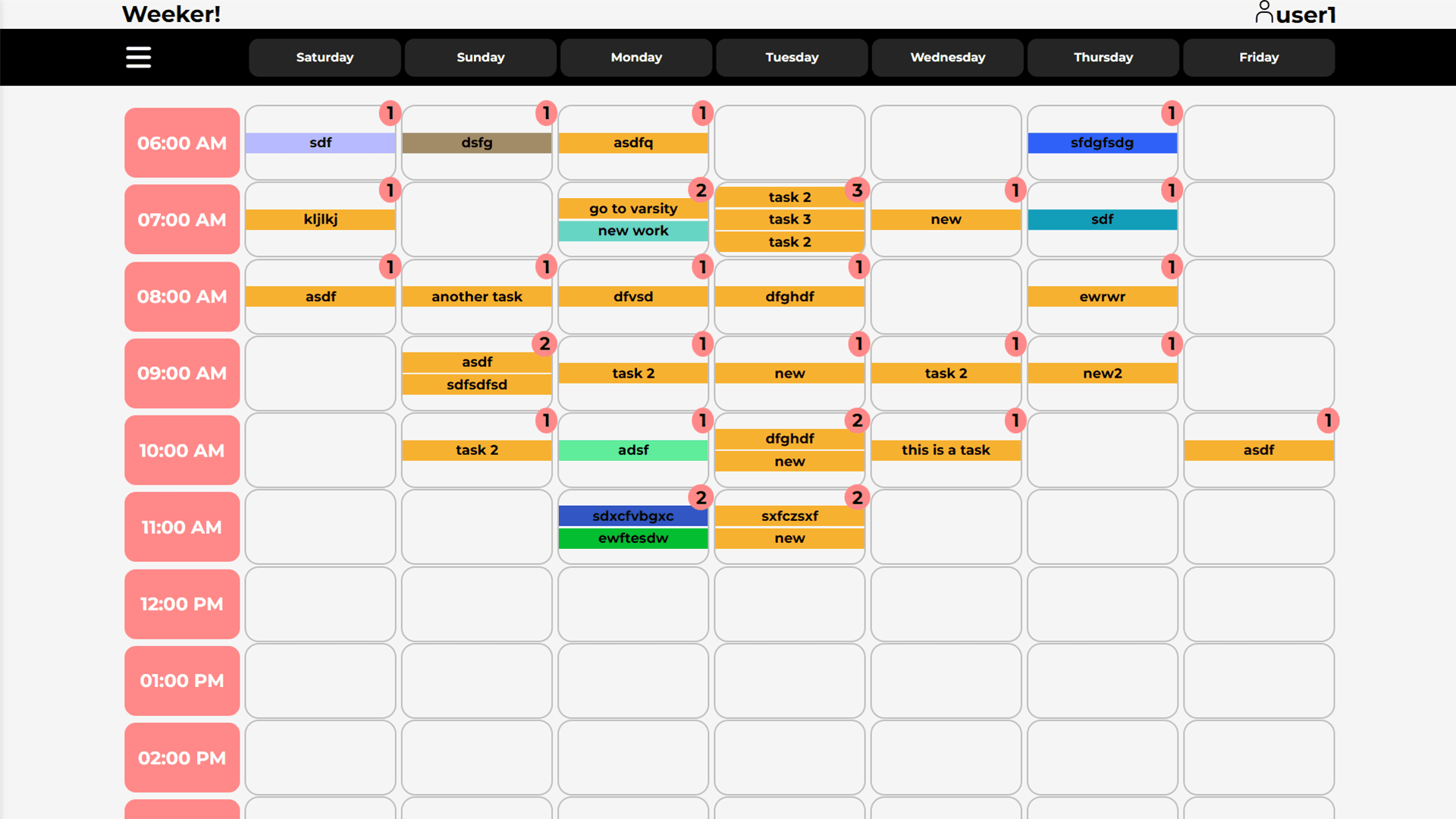
Weeker allows users to create personalized weekly schedules by adding tasks directly into time-based calendar blocks.
The application emphasizes clarity, flexibility, and control, enabling users to adapt the planner to their personal routines.
👤 Authentication & User Accounts
- User registration and login system
- Each user has an isolated and persistent routine
- Secure session handling between frontend and backend
- User-specific settings and task data storage
📅 Calendar-Based Routine Management
Weekly Calendar View
- Routine is structured across seven days of the week
- Each day is displayed as a column
- Each column contains hour-based time blocks
- Tasks are visually placed inside corresponding hour blocks
Task Management
- Click any hour block to add a task
- Assign a custom color to each task for visual distinction
- Edit or remove tasks as needed
- Tasks persist across sessions
⚙️ User Customization Settings
Users can personalize their routine view through settings:
- Select the starting day of the week
- Set the starting hour for the daily schedule
- Adjust the planner layout to match personal routines
These preferences are saved and applied automatically on subsequent visits.
🛠 Tech Stack
Frontend
- React — interactive UI and state management
- CSS — layout and visual styling
- JavaScript — client-side logic
Backend
- Node.js — server runtime
- Express.js — RESTful API
- MongoDB — persistent data storage for users, tasks, and settings
Package Manager
- Yarn
▶️ Installation & Setup
To run and setup this web application on local machine, one must need to have Node.js and MongoDB installed in their system.
Prerequisites
- Node.js (LTS recommended)
- MongoDB
- Yarn (Optional, npm can also be used)
Steps to Run the Project
- Visit the source code repository on GitHub
- Clone the repository
- Install server dependencies. Open the repository folder in a terminal window and execute this command:
yarn install
- Configure server environment variables
# Create a .env file in the root of the server directory.
# Add these variables with valid values in .env file.

MONGO_CONNECTION_STRING = #MongoDB connection string to connect to the DB.
SALT_ROUNDS = #Valid Salt Round value. Ex: 10
JWT_SECRET = # Valid JWT secret key. Ex: "jwt_secret"
CORS_ORIGINS = # Valid client address.
               #Comma separated if more than one. Ex: http://localhost:5173, https://abc.com
- To run the server, execute this command:
yarn dev
- Install client dependencies. Open "Front-end" folder in another terminal window and execute this command:
yarn install
- Configure client environment variables
# Create a .env file in the root of the client directory.
# Add these variables with valid values in .env file.

VITE_API_BASE_URL = #Valid API URL. Ex: http://localhost:3000/api
- To run the client, execute this command:
yarn dev
Please reach out to me if there is any difficulty in starting this project.
🕒 Timeline
- 2024 - Present - ongoing development with periodic updates and refinements
- July 2024: - Started developing the application using MERN (MongoDB, Express, React, Node.js) stack.
🎯 Purpose
This project was created to:
- Gain hands on experience in full-stack development with the MERN Stack
- Build a real-world scheduling and planning tool
- Implement calendar-based UI interactions
- Handle user-specific data and preferences
- Design a flexible and customizable productivity applicaiton
A productivity-focused application that transforms weekly planning into a clear and interactive experience.